Skip to content
Not a kitchen? Pick again

Hawker and coffeeshop stalls. Cafes, bakeries and dessert shops. Restaurants.

Customers order themselves, straight to your till.

01 Self-ordering and till

Customers order and pay at a kiosk, a table QR or ahead online. Every order lands on your till and kitchen screen.

No queue at the counter.

  • Try the kiosk Sample data
    How to use
    1. Tap what you want to order.
    2. Press Order and pay. The payment is confirmed for you.
    3. Your number lands on the till’s order screen, next door.

    Order here

    0 itemsS$0.00

    Demo: nothing is sent or paid.

    Self-ordering kiosk

    Customers order and pay at the kiosk. The order goes straight to the kitchen screen.

  • Try the till Sample data
    How to use
    1. Tap items to add them.
    2. Press Pay by PayNow. The payment is confirmed for you.
    3. Each sale lands in the command centre, next door.

    0 itemsS$0.00

    Order screen0 open
    • No orders yet
    Owner's sheetToday S$0.00
    Sales recorded by the demo till, newest first
    TimeItemsTotal
    No sales yet

    Ring up an order: fruit bowls, kopi or chicken rice. It lands on the order screen and in the owner's sheet.

  • Try order ahead Sample data
    How to use
    1. On the customer’s phone, pick food and a pickup time.
    2. Press Pay by PayNow. The payment is confirmed for you.
    3. On the stall’s panel below, move the order on to Ready.
    Pickup time

    0 itemsS$0.00

    Stall’s orders panel0 open
    • No orders yet
    Sold out todayTap to switch

    Demo: nothing is sent or paid.

    Order ahead for a coffeeshop stall

    Customers order and pay on their phone before they arrive. The stall marks it ready, or marks a dish sold out.

    Ask us about order ahead

The numbers behind it

  • Try the command centre Sample data
    How to use
    1. Ring up food on the food till.
    2. Each sale takes its ingredients off the stock.
    3. Low items join the reorder list. Tap a dish to see its recipe.
    TodayS$0.00
    Orders0

    Fuji Apple bowl, one portion: 2 apples, 1 bowl.

    Stock on handReorder at
    • Apples8 pcsat 4 pcs
    • Strawberries1,000 gat 400 g
    • Bowls6 pcsat 3 pcs
    • Coffee powder200 gat 100 g
    • Condensed milk200 mlat 100 ml
    • Cups10 pcsat 4 pcs
    • Rice1,000 gat 400 g
    • Chicken800 gat 350 g
    • Chilli150 gat 60 g
    Reorder list0 items
    • Nothing to reorder

    Owner's command centre

    Every sale draws down its recipe, so you know what to reorder before it runs out.

  • Try the dashboard Sample data
    How to use
    1. Press 7 days, then 30 days.
    2. Back on Today, compare with the same day last week.
    3. Pay an order ahead next door, or mark a dish sold out, and watch Today.
    SalesS$0.00
    Orders0
    Order ahead0

    Orders by hour
      Best sellersToday
        Sold out atToday

          Owner’s sales dashboard

          Today so far against the same day last week, orders by hour, and the time each dish sold out.

          Send us a demo sales sheet, made-up numbers are fine

        What we built.

        A sports venue and its cafe.

        • Order from the table. Guests scan a QR and order from the cafe menu, with photos.
        • Two tills. One for bay bookings by the hour, one for the cafe.
        • Member or public price. The till asks before each order.
        • PayNow on the till. The owner changes the menu behind a PIN.
        • A members list. Find a member by number, with their tier, notes and WhatsApp consent. Duplicates merge, and their old member list came straight in.

        A food business with several stalls.

        • Expenses on the till. Market runs, wages, utilities and suppliers, with a photo of the receipt.
        • Supplier bills. Mark an invoice paid and see what is still owed.
        • One owner view. Sales from every stall, with the expenses and the cash in the drawer.

        hellointuon.

        Online ordering.

        02 Marketing

        We run your Meta ads, and plan, make and post for you. Ad spend is paid by you, straight to Meta.

        Ads and posts that sell.

        Learned from top performers.

        03 Live selling

        Creators brought in for you to cook and sell your food on camera.

        Sell it live.

        Made with creators like these

        • Live selling example

          Live selling

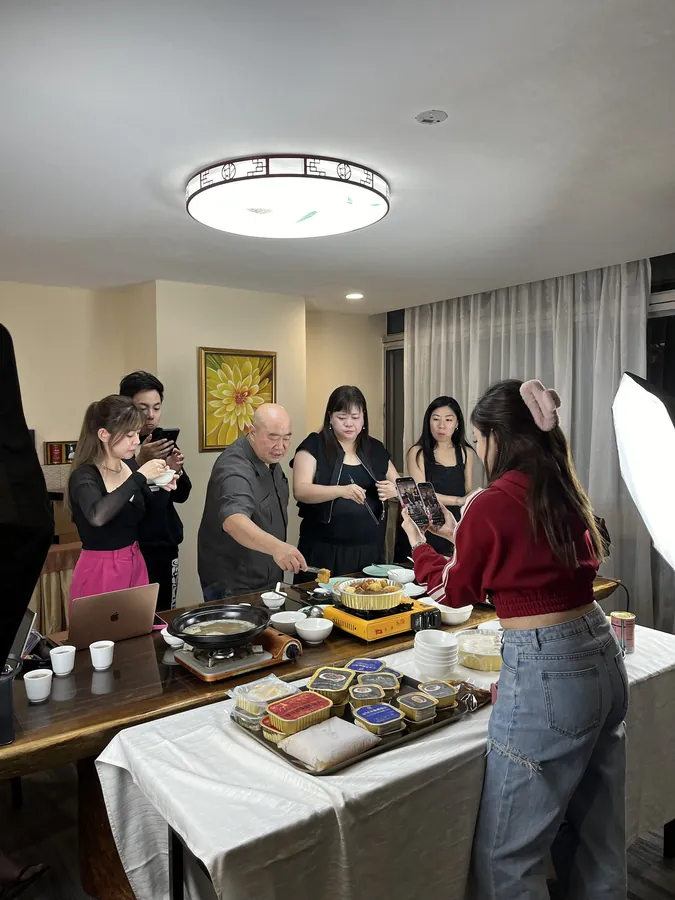
          A food live, cooked and sold on camera.

          @ladiesfirstTeochew Restaurant Huat Kee

        Plans

        Pick your Caddie Kitchen.

        • Front.

          SGD 129 a month per outlet

          A till and table QR. On every device, saved online and backed up, set up for you, with help on WhatsApp.

        • Our pick

          Front and back.

          SGD 199 a month per outlet

          Stock and recipes, food cost, staff log-ins, the owner view and a customer list shared by every tool.

        • Front, back and online.

          SGD 299 a month per outlet

          Front and back, plus online ordering and order ahead.

          WhatsApp us

        Set up for you with your items, included in every plan.

        Add-ons.

        Self-order kiosk, SGD 149 a month per kiosk. Kitchen screen, SGD 49 a month per screen. Hardware quoted separately.

        Hardware to run it

        Hardware to run it.

        Supplied through our partner Dabton

        Built for a hot, wet kitchen. We set every device up with your menu before it reaches your counter.

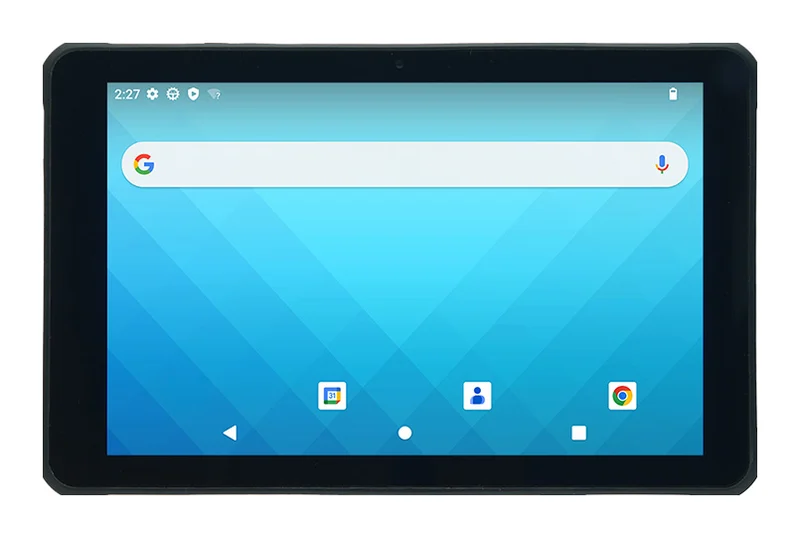
        • Recommendedunitech RT112 rugged Android tablet, front view

          Till

          unitech RT112 tablet

          Rings up orders at the counter. Sealed, so oil and spills wipe off.

          • 10.1 inch screen, 1920 x 1200, works with wet fingers and gloves
          • Android 13
          • IP67 sealed against water and dust, survives a 1.5 m drop
          • Removable battery, up to 17 hours
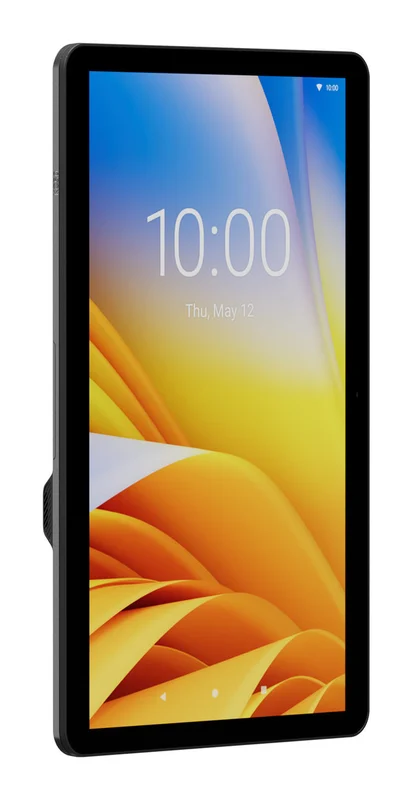
        • OptionalZebra KC50 Android kiosk screen, upright

          Self-order kiosk

          Zebra KC50 kiosk

          For the self-order kiosk add-on. Customers order on the screen and it goes to the kitchen.

          • 15 or 22 inch touch screen, 1080 x 1920
          • Android
          • IP65 sealed front
          • Mounts on a wall, floor stand or counter
          • Wi-Fi 6E and wired Ethernet
        • Optionalunitech RT112 rugged Android tablet, front view

          Kitchen or customer screen

          unitech RT112 tablet

          A second RT112 on the kitchen wall for the kitchen screen add-on, or facing the customer to show the order and the total.

          • 10.1 inch screen, 1920 x 1200, works with wet fingers and gloves
          • Android 13
          • IP67 sealed against water and dust, survives a 1.5 m drop
          • Removable battery, up to 17 hours
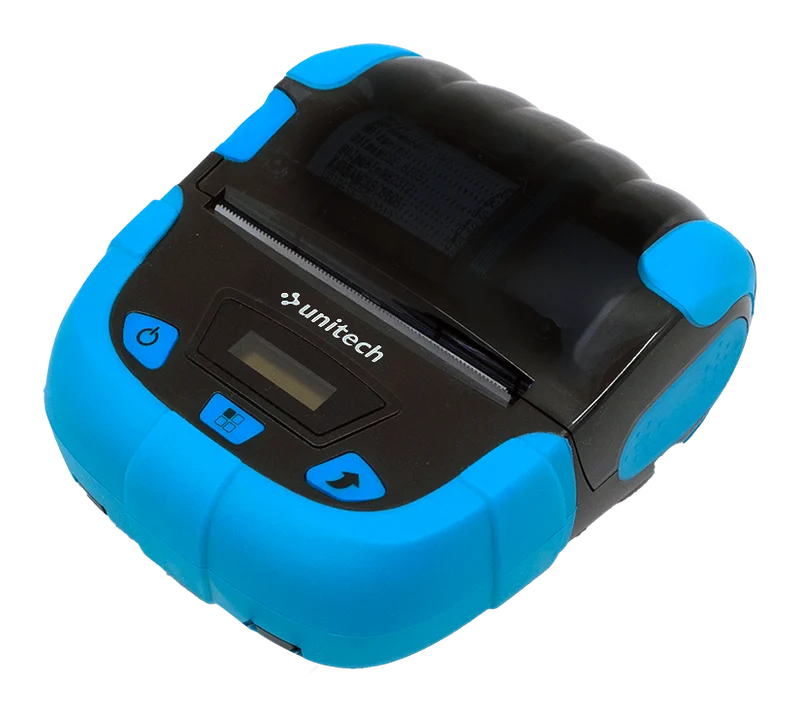
        • Optionalunitech SP320 thermal receipt printer

          Portable printer

          unitech SP320 printer

          For deliveries and orders taken at the table. You tear the receipt off; it has no cash drawer port.

          • 80 mm thermal paper, 203 dpi
          • ESC/POS, the language the till prints in
          • Bluetooth 5.0 and USB-C
          • Battery, up to 4 hours of printing

        Counter receipt printers (with a paper cutter and cash drawer port) and cash drawers are sourced on request. Already have devices? Use your own. Hardware quoted separately; card terminals come from your bank.

        Want us to run it with you? Care plans
        • Free.

          Our shop tools on one device: till, stock list and bookings, to try first.

        • Care.

          Keep things running: website edits each month, our ready-made tools set up for you, and WhatsApp help within 2 working days.

        • Grow.

          Bring in more customers: Meta ads or social each month (you pick one), your Google Maps profile kept up, reorder alerts, a monthly report and WhatsApp help the same day.

        • Partner.

          Everything in Grow, plus Meta ads and social both, Google Search ads, a leak review every quarter, a monthly strategy call and priority WhatsApp help. Limited spots.

        Contact

        Tell us what’s eating your day.

        One chat on WhatsApp. You’ll get a reply from a real person, not a bot.

        Tick what fits and your message is ready to send.

        Rather just message? WhatsApp +65 8033 2357

        What do you need help with?
        What kind of business?
        Your message

        Send on WhatsApp

        Nothing is sent from this page. WhatsApp opens with your message ready, and you press send.

        WhatsApp us